How to Protect Ad Campaigns from Bots and Low-Quality Traffic
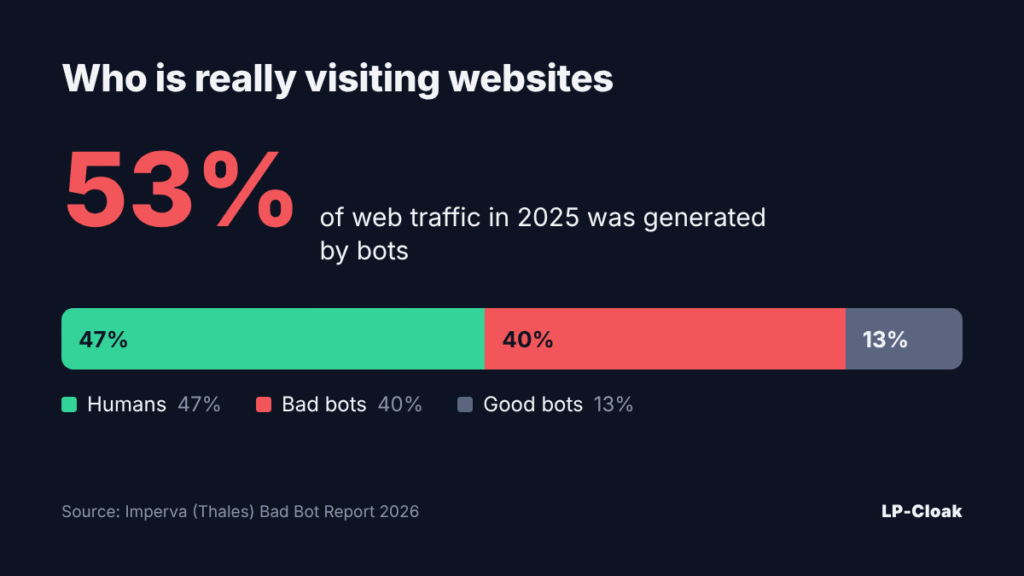
You pay for a click, and a script lands on your page. It never fills in the form, never buys, and it pollutes the data your campaign optimization learns from. According to the Imperva Bad Bot Report 2026, bots generated 53% of all web traffic in 2025, and bad bots alone made up 40%. Real people accounted for just 47% of site visits.
What Bots Cost Advertisers
Lunio analyzed 2.7 billion paid clicks across Google, Meta, TikTok and other networks and put losses to invalid traffic in 2025 at $63 billion. In a separate Lunio survey, 75.6% of marketers said they lose more than 5% of their monthly budget to bots. Only 5.3% use a dedicated protection tool.
For a media buyer, the damage comes twice. The money for fake clicks is already gone, and the pixel has been fed bot signals, so it now looks for a “lookalike” audience among more bots. Cost per lead climbs even when the creative and the offer work fine.
Who Is Behind Low-Quality Traffic
- automated clickers and bot farms inflating impressions and clicks;
- spy tools and scrapers collecting your creatives and landing pages;
- competitors visiting manually through a VPN or an antidetect browser;
- traffic from data centers and hosting providers instead of home ISPs;
- visitors from the wrong GEOs who slipped in through broad targeting.
How to Spot Bots in Your Stats
Warning Signs to Watch
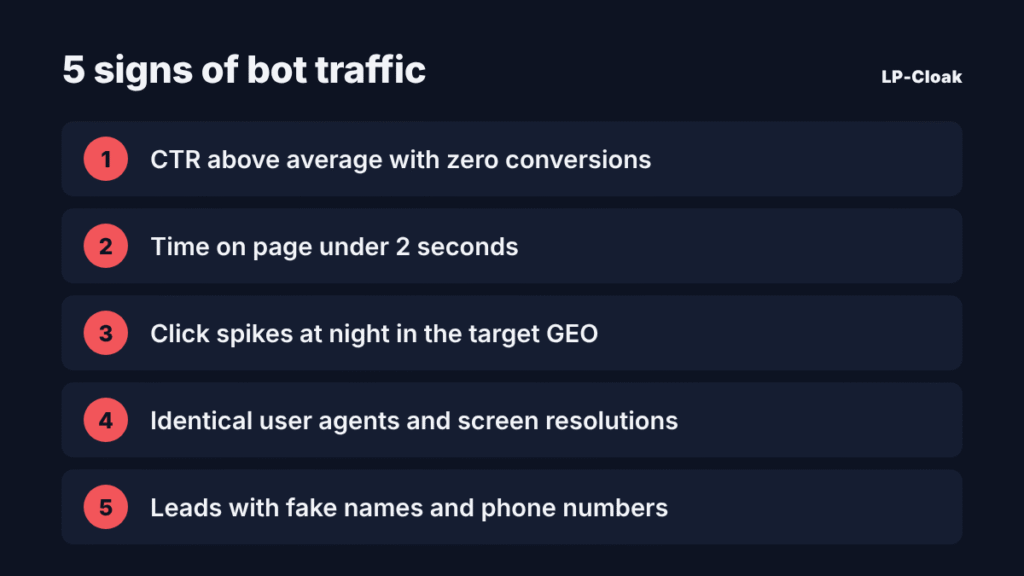
Check the campaign during the first days after launch, while the budget is still small. Red flags include a CTR above the vertical’s average with zero conversions, time on page under 2 seconds, click spikes at night in the target GEO’s time zone, identical user agents and screen resolutions, and leads with made-up names or dead phone numbers.
Why Manual Checks Are No Longer Enough
Spider Labs reports that in 2026, 64.4% of automated invalid traffic mimics real user behavior. These bots scroll, move the cursor and come from residential IPs. A hand-built IP blacklist goes stale within days.
Layered Campaign Protection
Layer 1. Ad Account Settings
Narrow GEO targeting to the regions you need, exclude placements with abnormal CTR, and schedule ads for your audience’s active hours. This removes part of the junk before the click, but it won’t stop targeted bots.
Layer 2. Filtering Every Visit
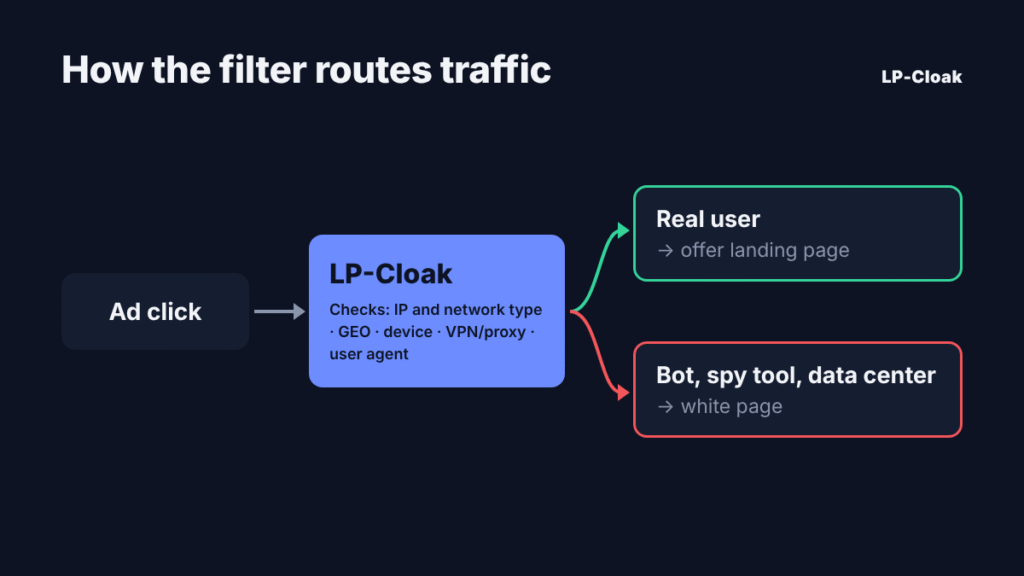
The main defense works at the site level. A traffic filtering service checks each visitor in a fraction of a second and decides which page to show. A real user sees the offer page, while bots and spy tools get the white page.
What the Filter Checks
The IP address and network type (home ISP, mobile carrier or data center), GEO, device and operating system, user agent, VPN and proxy use, browser language and referrer. The more parameters the filter cross-checks, the lower the odds for a bot that faked only one of them.
Layer 3. Lead Quality Control
Some junk leads will get through even after filtering. Validate phone numbers in the form, send leads to a CRM and track approval rates per traffic source. That shows you which placements bring traffic that never reaches a purchase.
How LP-Cloak Filters Out Bots and Untargeted Visitors
LP-Cloak is a cloud-based traffic filtering service. It analyzes every click in real time and detects bots, spy tools, scrapers and data-center visits. Targeted visitors reach the main page, and everyone else sees the white page.
Setup takes a few minutes through a PHP integration, with no coding required. The service works with Facebook, Google Ads, TikTok and other sources. The dashboard offers flexible filters, blacklists, A/B page testing and detailed stats showing how many visits were filtered out and why. One stream is free with no time limit, and paid plans start at $29 per month. Setup guides for different traffic sources are published on the LP-Cloak blog.
The filter and the white page work as a pair. The filter decides who sees what, and the page for filtered traffic should look like a real website with content, not an empty placeholder.
Pre-Launch Checklist
- Connect a traffic filter to your landing page before ads go live.
- Set the allowed GEOs, devices and network types.
- Prepare a solid white page that matches the campaign topic.
- Make sure UTM tags and the pixel pass data correctly.
- For the first 2–3 days, compare filter stats with ad account data daily.
- Turn off placements where the share of filtered traffic stays above average.
Bots aren’t going anywhere, and there are more of them every year. Build filtering into every launch, the same way you set up the pixel and UTM tags.